Live Sports Player – API Consumption
Project Overview
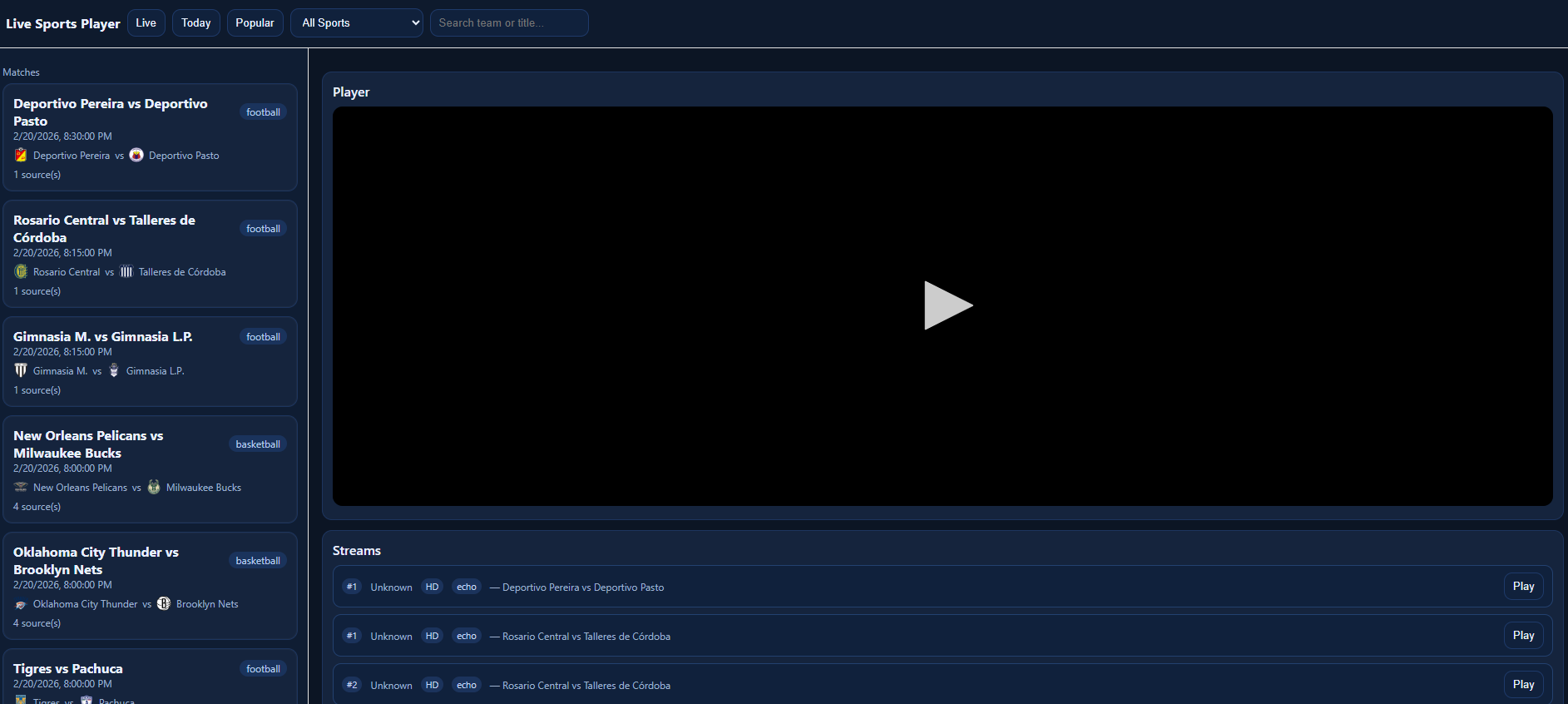
As a soccer enthusiast, I wanted a centralized web interface to watch live matches without navigating multiple streaming sites. Using a free public sports API, I built a fully client-side live sports player that aggregates ongoing, today’s, and popular matches across multiple sports. The application dynamically fetches match data, allows filtering by sport or team/title, and embeds live streams directly into a responsive web-based player without requiring any backend services.
Final Product: live Sports Player
Technologies Used
- JavaScript (ES6)
- HTML5 / CSS3
- Fetch API
- REST API Integration
- DOM Manipulation
- iframe Embedding
- Client-Side Filtering & Search
Key Concepts & Keywords
- Live sports streaming
- API consumption
- Dynamic content rendering
- Match aggregation
- Real-time updates
- Search and filtering
- User interaction and event handling
- Frontend integration
- Client-side data processing
- Responsive UI design
Core Implementation
The application consumes the public sports API to fetch sports categories, matches, and available stream sources. Data is dynamically rendered into an interactive UI where users can browse live matches, filter by sport, search by team or title, and select from multiple streaming providers for each match.
// Fetch live matches
async function loadMatches() {
  const res = await fetch("https://streamed.pk/api/matches/live");
  const matches = await res.json();
  renderMatches(matches);
}

// Load selected stream into iframe player
function playStream(embedUrl) {
  document.getElementById("player").src = embedUrl;
}
Step-by-Step Guide
- Select an API: Used the public sports streaming API to retrieve sports, matches, and stream sources.
- Design the UI: Built a responsive layout with a sidebar for matches and a main embedded video player.
- Fetch Sports and Matches: Implemented Fetch API calls to dynamically load sports categories and match data.
- Render Dynamic Content: Used JavaScript DOM manipulation to display matches and stream options interactively.
- Implement Search & Filtering: Added client-side filtering by sport, team name, or match title for quick navigation.
- Embed Streams: Integrated iframe embedding to play selected live streams directly within the application.
- Aggregate Multiple Sources: Collected all stream providers for a match and displayed selectable playback options.
- Enhance UX with Event Handling: Added click handlers and dynamic updates to avoid page reloads.
Popup Blocking & Security Enhancements
Many third-party stream providers attempt to open popup windows or redirect users. To improve user experience, popup interception logic was implemented to block new windows and instead load links within the embedded player.
// Block popup windows
window.open = function(url) {
  console.log("Blocked popup:", url);
  if (url) {
    document.getElementById("player").src = url;
  }
  return null;
};

// Prevent target="_blank" links from opening new tabs
document.addEventListener("click", e => {
  const link = e.target.closest("a[target=_blank]");
  if (link) {
    e.preventDefault();
    document.getElementById("player").src = link.href;
  }
});
Challenges Faced
- Unreliable Stream Providers: Some streams triggered popups or redirects, requiring client-side interception logic.
- Inconsistent API Responses: Different sports returned varying JSON structures, requiring normalization before rendering.
- Real-Time Data Updates: Live matches frequently changed, requiring periodic refetching and UI refresh handling.
- Client-Side Only Limitations: Without a backend proxy, security controls and stream sanitization were limited.
- Performance Optimization: Filtering large match lists required debouncing and efficient DOM updates to prevent UI lag.
Final Outcome
The project successfully delivered a responsive and interactive live sports streaming web application that dynamically consumes a public REST API. Users can browse live and upcoming matches, filter by sport or team, and play streams directly within the interface. The entire solution runs client-side with no backend dependencies, demonstrating strong frontend engineering, API integration, and dynamic state management skills.
Future Improvements
- Implement backend proxy to sanitize and stabilize stream URLs
- Add WebSocket support for true real-time match updates
- Persist favorites/watchlist using localStorage
- Improve popup blocking with stricter iframe sandbox and CSP policies
- Add adaptive player logic to automatically switch to the healthiest stream